
The Orchestration Layer
From vague questions to grounded specs

At Makers & Breakers, I write about what it actually takes to build products — the engineering, the leadership, the systems thinking. These pieces come from real projects and real mistakes. Some challenge assumptions. Most just try to be honest about what I’ve seen work and what hasn’t.
This is Part 3 of a series. If you missed the earlier parts: Part 1: The Narrow Landing Surface · Part 2: The Context Tax

Part 2 built the foundation — a structured knowledge base that loads the right context for the right task. The model knows your codebase. It can follow your conventions. The memory layer is in place. The next layer is what you do with that context.
The AI-assisted product lifecycle
Building software with AI changes the shape of the work, but the phases don’t disappear. You still discover, explore, design, validate, build, review, and ship. What changes is how much of each phase the AI can handle — and the answer varies by phase.
Here’s how I think about it:
Discovery + exploration— Can we do this? What already exists? What’s feasible? What would it look like? This phase used to take weeks — meetings, alignment sessions, senior engineers pulled into feasibility assessments, product managers writing specs nobody had time to validate. With the right orchestration, that compresses to hours. Ideas that sat in the backlog for two years — because nobody had three weeks for proper investigation, or because they were too expensive to build — can be shaped, grounded, and prototyped in an afternoon.
Grounding + specification — Does the approach actually work against our codebase? What conflicts with existing patterns? What’s the implementation plan? This is where context from the KB matters most — the model needs to know your architecture to validate against it.
Execution — Write the code, run the tests, ship the feature. This is where most people focus their AI efforts. It’s also where orchestration matters least on a per-task basis, because individual coding tasks are already well-scoped.
Review + feedback — Did the output follow the conventions? Did anything regress? Do the corrections feed back into the system? This is the loop that makes everything else compound.
The surprise? The biggest gains sit in discovery and exploration. Teams used to compress this phase by cutting it — senior engineers pulled off other work, meetings cut short, specs rushed. With the right orchestration, you compress it the other way: the same thinking at the same quality, in a fraction of the time. That’s what this article is about. The next one covers autonomous execution.
The biggest gains sit in discovery and exploration.
A model with perfect context will still try to solve the entire problem in a single pass if you let it. “Build a data export feature” becomes one giant prompt, one giant output, and a dozen implicit decisions — which API pattern to follow, whether to add a background job, how to handle permissions, what the UI should look like. You’ll find out which decisions were wrong when you read the diff.
Orchestration prevents that. It breaks work into steps where each step is a smaller, more constrained problem, grounded against the knowledge base before the next one begins.
You don’t start by building this
There’s already good work to borrow from. It sits in two layers, and it helps to see them separately.
The first layer is the method — how work decomposes into phases. A partial list of methods doing this work today: BMAD-METHOD (Build More Architect Dreams) splits the lifecycle across agent personas (analyst, PM, architect, dev, QA) and hands story files between them. Spec-Driven Development, in forms like GitHub’s Spec Kit, Amazon’s Kiro, and the cross-agent cc-sdd, makes the spec the contract and walks requirements → design → tasks in that order. GSD treats the problem as context engineering: fresh subagent windows per phase, plans running in parallel waves, one atomic commit per task. Garry Tan’s gstack, organises 23 skills around engineering-team roles with a conductor agent forcing strategic thinking before code.
Tan’s accompanying essay argues for the same architecture this series is building: a thin harness wrapping fat skills, skills composing into pipelines, skills as permanent upgrades. The convergence isn’t coincidence. Two routes to the same destination — his on-ramp starts from “what does the Claude Code source leak actually reveal,” mine starts from “why does the harness need to be narrow” (Part 1) and “why do skills only work if the knowledge base underneath exists” (Part 2). Same shape.
The second layer is the surface — where the method runs. Claude Code ships built-in workflows. GitButler composes AI operations into its version control flow. Conductor and similar platforms coordinate parallel agents with human checkpoints. These are runtimes, not methodologies. You can run BMAD inside Conductor or pipe GSD commands through Claude Code — the surface is orthogonal to the method.
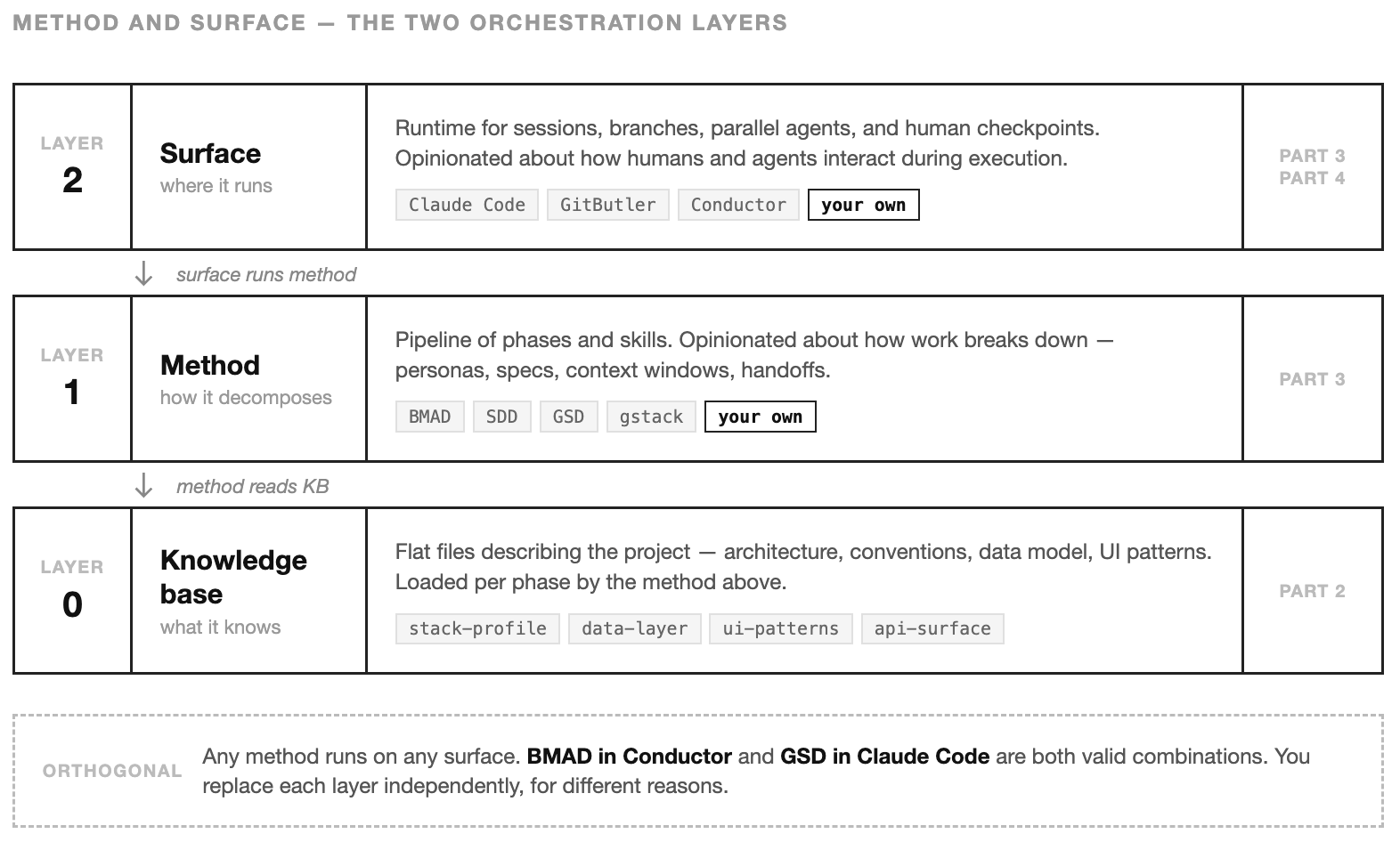
Start with one of each. Use someone else’s method and someone else’s surface for a few months. You’ll learn which steps matter, where the handoffs break, what kind of human input each stage needs, and which friction comes from the method versus the runtime.
This follows the same progression as the previous article. I suggested starting with flat files before moving on to vector databases. Here, I recommend beginning with an existing framework and surface before developing custom pipelines.
The direction of fit matters. Adapt to someone else’s tools long enough to know what you actually need. Then build your own. Both layers eventually get replaced — but independently, for different reasons. Teams that skip the first half end up with cargo-culted personas and spec templates nobody reads. Teams that skip the second half stay in someone else’s workflow forever.
Teams that skip the first half end up with cargo-culted personas and spec templates nobody reads. Teams that skip the second half stay in someone else’s workflow forever.
When generic orchestration stops fitting
The gap shows up gradually. The platform’s workflow says “generate then review.” Your team needs “read the existing pattern first, then generate following that pattern, then validate against conventions, then integrate.” The steps don’t match.
Or the platform treats every task the same way. A new API endpoint gets the same pipeline as a CSS fix. But those are fundamentally different problems — one needs data-layer context and API conventions, the other needs UI patterns and component structure. A generic pipeline loads generic context.
Or the handoffs between steps don’t carry the right information. Step one produces code. Step two reviews it. But nobody checked whether the proposed approach conflicts with the existing architecture before the code was written. The review catches problems that should have been prevented.
These are the gap between how a general tool thinks about work and how your team really works. Tooling mismatch, not platform failure. When that gap costs you more than building your own pipeline would, it’s time.
What a skill is
The building block is a skill — a structured instruction file that an AI agent can execute. Not a prompt. Skills follow the open Agent Skills standard: a SKILL.md file with YAML frontmatter (name, description, allowed-tools, model, and other metadata) and a free-form markdown body. The body has no required sections — each team can structure it however works for them. The sections we use in the Harness: which KB files to read, what process to follow, what output to produce, what guardrails to enforce.
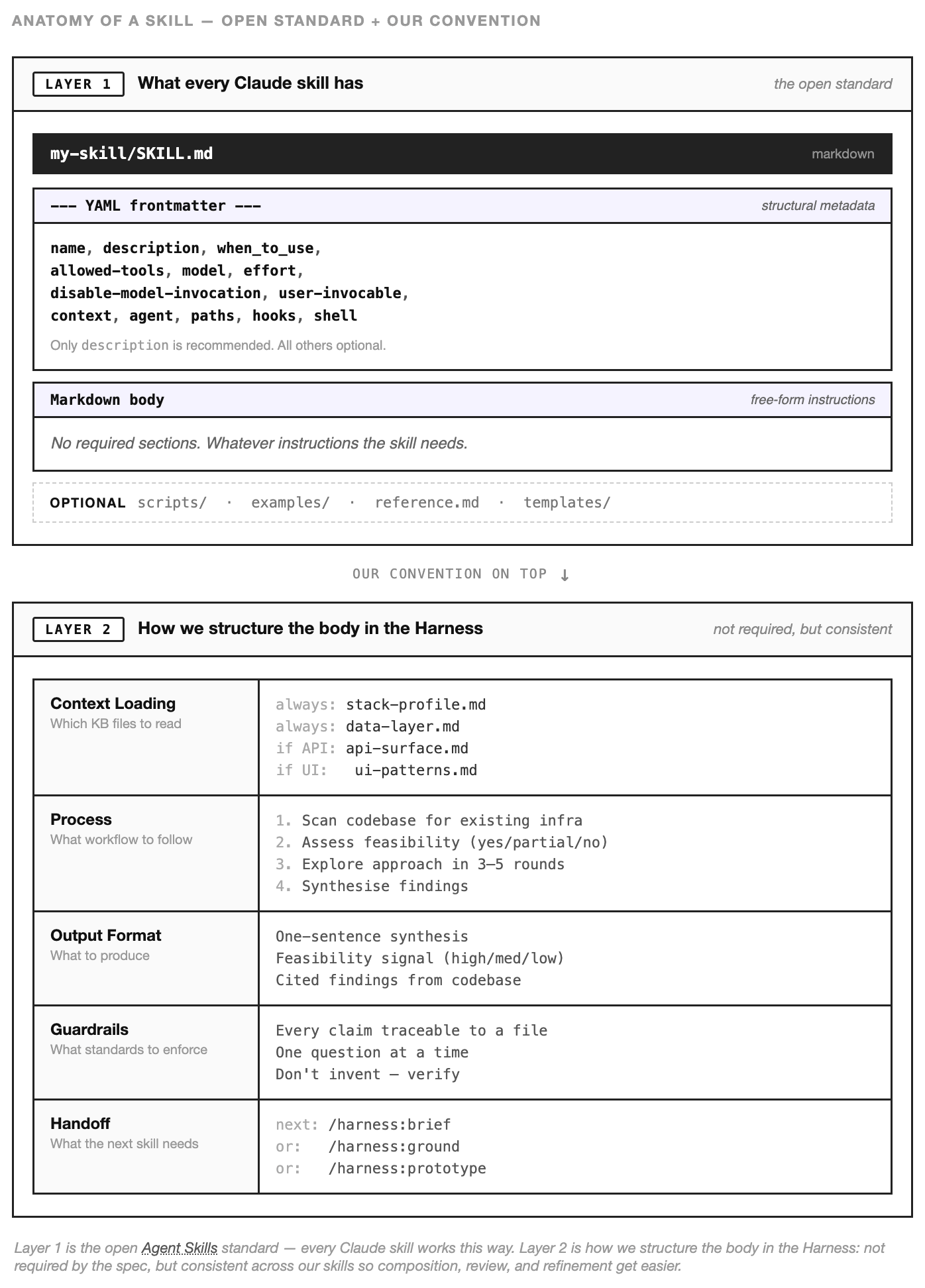
A prompt says “build a data export feature.” A skill says: read api-surface.md and data-layer.md first. Check if similar export patterns already exist. If they do, follow that pattern. If they don’t, propose an approach and validate it against the conventions in the KB. Produce output in this format. Flag anything that conflicts with existing architecture.
The difference is that a skill encodes how to approach a category of problem — not a one-time instruction for a single task. The skill for shaping a feature idea is reusable across every feature idea. The skill for grounding a spec against the codebase works for every spec. Each skill captures a workflow that the team has refined through use, and each run of the skill follows that workflow consistently.
Skills are files. They live in the repo. They’re versioned, reviewable, and editable by anyone on the team. When someone finds a better way to approach the work, they update the skill — and every future session benefits.
How skills compose into a pipeline
A single skill is useful. A sequence of skills — each one narrowing the problem for the next — is where the real leverage appears.
This pipeline covers the discovery and grounding phases from the lifecycle earlier. Part 4 covers what happens when the grounded spec runs. Shape, brief, design, prototype, ground — each step compresses work that used to require meetings, senior engineers, and weeks of calendar time. The pipeline doesn’t replace product thinking. It makes product thinking fast enough that teams actually do it.
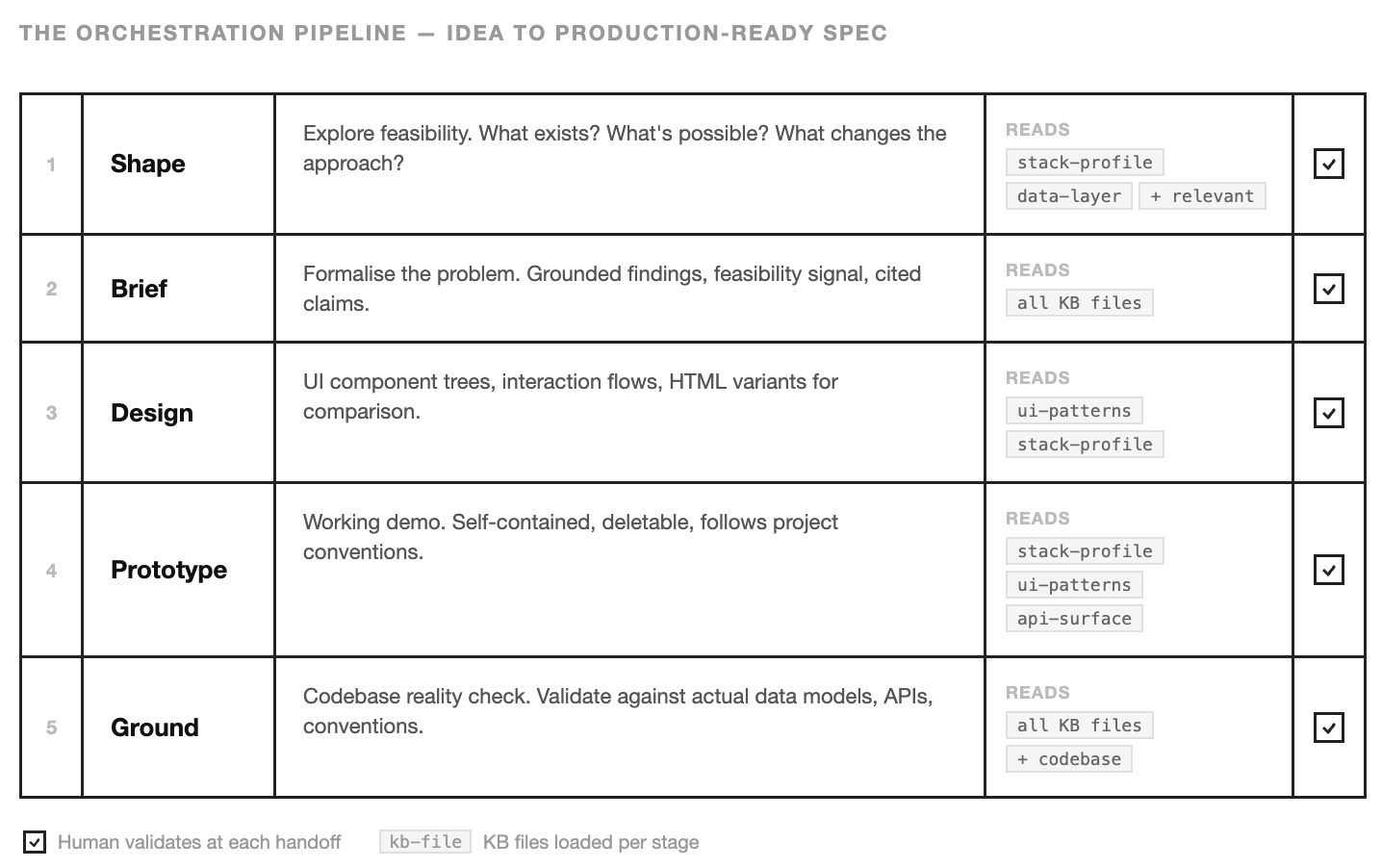
Here’s the pipeline. An idea enters as a vague question and exits as a production-ready spec with validated technical decisions, UI designs, and a working demo.
Shape
“Can we do this?” The shape skill explores feasibility. It reads the KB — stack profile, data layer, whatever’s relevant to the question — and scans the codebase to understand what already exists. If half the infrastructure is already in place, that changes the entire approach. If the data model doesn’t support what the feature needs, better to know now than after someone has written 500 lines of code.
The output is a synthesis: here’s what we found, here’s what’s feasible, here’s the confidence level. It’s the conversation you’d have with a senior engineer before committing to a direction — compressed into a structured artefact that the next skill can consume.
Snapshot from the skill file, the part that does the work:
Mode A — Quick Capability Check

1. Classify question domain: Data / API / Jobs / UI / Integrations
2. Answer with a confidence signal:
   - Yes        — cite the specific table, job, endpoint, component
   - Partial    — what exists and what's missing
   - No, but    — alternative approaches using existing infrastructure
   - No         — explain the gap
3. Offer next steps: deeper exploration, /brief, or /ground
...
The confidence signal is the load-bearing part. Yes without a citation is a hallucination. No, but is the answer that unblocks most conversations. A generic prompt would give you a confident paragraph. The skill gives you a classification the next step can route on.
Brief
The brief skill takes that exploration and formalises it. Not a PRD — those tend to be aspirational. A brief is grounded: here’s the problem, here’s what we found when we looked at the codebase, here’s what exists today, here’s what would need building, here’s the feasibility signal.
Every finding is cited to a specific file or table in the codebase. “The payments table already has an exported_at column” is a grounded claim. “We should add export capability” is not. The brief forces grounded claims.
The structure the skill enforces:
Brief Structure
1. Problem / Opportunity
2. Key Findings       (cited to specific files, tables, components)
3. What Exists Today  (concrete inventory)
4. What Would Need Building
5. Feasibility Signal (confidence, T-shirt effort, appetite)
6. Open Questions
7. Recommended Next Step

Guardrail: every "What Exists" claim must cite a specific file,
           table, or component.
...
Seven slots. The hardest one is usually slot 3 — “What Exists Today.” That’s where the shape skill’s work pays off. Without the KB underneath, the model fills that slot with plausible-sounding guesses. With the KB, it fills it with file paths.
Design
The design skill takes the brief and produces UI — component trees, interaction flows, layout decisions. It reads ui-patterns.md from the KB to understand the existing component conventions, then produces HTML variants the team can open in a browser and compare. These variants differ in meaningful user experience dimensions rather than cosmetic ones.
The part that keeps the design honest is a simple reuse analysis:
Reuse Analysis

| Need        | Existing Component    | Action                    |
|-------------|-----------------------|---------------------------|
| Data table  | {existing pattern}    | Reuse with custom columns |
| Form        | {existing pattern}    | Follow same pattern       |
| Chart       | None exists           | Build new, follow {style} |

Guardrail: every component should trace back to a data source.
The table forces the designer (model or human) to name existing patterns before inventing new ones. Most “new” components turn out to be existing ones with different labels. The table catches that.
Prototype
The prototype skill turns the chosen design into a working demo. Self-contained, deletable, built following the project’s actual conventions — not a generic scaffold. The team can interact with it, test the flow, find the gaps. The prototype is cheap to throw away because that’s the point — it exists to validate the approach before committing to production code.
The skill breaks the work into four phases and pauses between each:
Build in Phases

Phase 1 — Foundation    types, layout shell, basic page structure
Phase 2 — Core Flow     main components, data fetching
Phase 3 — Integration   real data, API calls, state management
Phase 4 — Polish        loading, error, and empty states

After each phase: "Want to review before continuing?"

Guardrail: prototype must be self-contained — deletable without
           side effects on the rest of the codebase.
The pause between phases is the part that usually gets skipped by a single prompt. “Build the prototype” produces polish on top of a shaky foundation. Four pauses surface the foundation problems while they’re still cheap to fix.
Ground
The final step before execution. The ground skill takes everything — the brief, the design decisions
This is where mismatches surface. The design assumed an API endpoint that doesn’t exist. The data model needs a migration that touches a high-traffic table. The prototype used a pattern that conflicts with the auth wrapper. Ground catches all of this before anyone writes production code.
Two parts of the skill do most of the work. First, a deep-query table that forces the model to check each aspect of the feature against the codebase rather than trusting the brief:
Deep-Query Table

| Question                        | Where to look                           |
|---------------------------------|-----------------------------------------|
| What data entities exist?       | data-layer.md + schema/model files      |
| What jobs/async relate?         | async-jobs.md + job definition files    |
| What API endpoints exist?       | api-surface.md + route files            |
| What UI components exist?       | ui-patterns.md + component directories  |
Second, the spec itself has a fixed structure with the Codebase Reality Check as slot two — not an afterthought at the end, but the frame the rest of the spec hangs on:
Grounded Spec (9 sections)

1. Summary
2. Codebase Reality Check  ← the centrepiece
3. Data Model Changes
4. API Changes
5. UI Changes
6. Async / Job Changes
7. Integration Changes
8. Implementation Order
9. Test Scenarios

Guardrail: every claim about "what exists" must include a file path.
The file-path guardrail sounds small. It’s the single line that separates a grounded spec from an aspirational one.
The pattern
Each skill reads different KB files. Each produces output that narrows the space for the next skill. Each involves the human at the handoff — you review the shape before commissioning the brief, review the brief before designing, review the design before prototyping, review the prototype before grounding.
The model never solves the whole problem at once. It solves one piece, the human validates, and the next skill starts from a stronger position. Progressive narrowing, grounded at every step. Why the small rules do the work These snippets look small. A table, a checklist, a numbered list, a guardrail sentence. Easy to read them and assume you could have written the same thing in five minutes.
The reason to take them seriously: the model wouldn’t have produced them on its own. A generic prompt gives you confident prose. A skill gives you a confidence signal Shape can route on, a cite-every-claim rule Brief enforces, a file-path guardrail Ground uses to separate grounded specs from aspirational ones. Each rule is small. Each rule changes what the next step in the pipeline can do. The how is doing most of the work. Not the framework, not the scaffolding, not the model.
The small, focused rules — the kind that look like they belong in a team wiki — are the load-bearing part. Skills look deceptively simple. That’s the point. Simple enough to fit in a file, precise enough to change what the model produces on the other side.
What this prevents
Without orchestration, the developer says “build a data export feature” and the model tries everything at once. It picks an API pattern (maybe the right one, maybe not). It designs a UI (without knowing your component conventions). It writes the migration (without checking if the column already exists). It builds the whole thing in a single pass, and the developer reviews a 400-line diff trying to spot the decisions that were made implicitly.
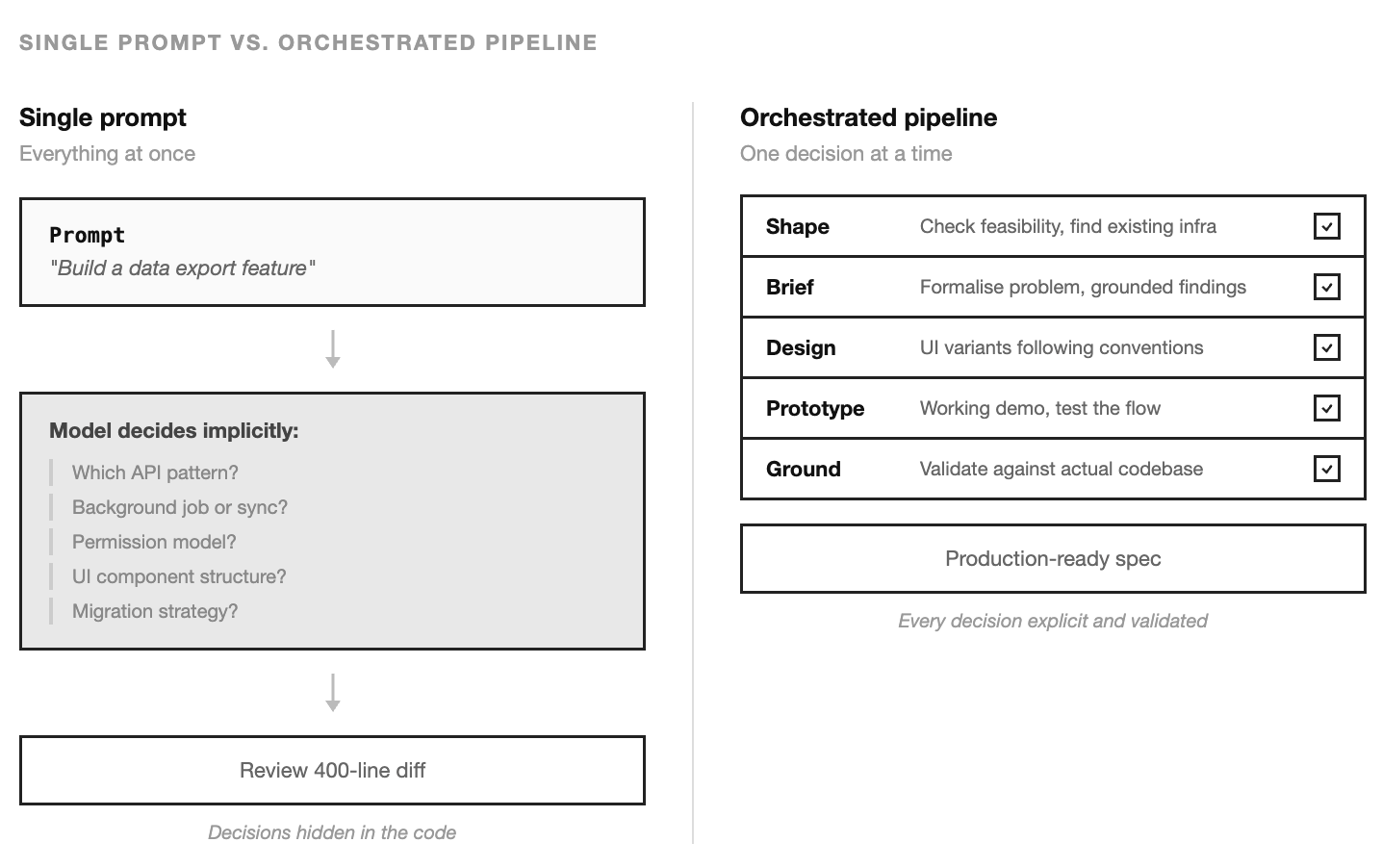
Some of those decisions will be wrong. The wrong ones are invisible in the diff because the code looks plausible. It compiles. The types check. The test passes. The problem surfaces three weeks later when another feature touches the same table and the patterns conflict.
The pipeline prevents this by making each decision explicit and sequential. Feasibility is checked before design begins. Design follows existing conventions because the skill reads the KB. The prototype validates the approach before production code is written. The ground step catches conflicts before they’re merged.
The pipeline is slower than a single prompt. It produces better output because each step has a smaller problem to solve and more relevant context to solve it with.
Who runs the skills
A skill is a file. Someone has to run it. The pipeline above runs under a single agent — the harness-pilot. Its whole job is to sit in front of the five skills, manage the handoffs, pause at each step for human review, and record what each step produced so the next step can read it.
From the agent file:
---
name: harness-pilot
description: Runs the interactive discovery pipeline.
  Handles the full shape → brief → ground → design → prototype flow.
model: sonnet
memory: project
skills:
  - harness:shape
  - harness:brief
  - harness:ground
  - harness:design
  - harness:prototype
---

You are the harness-pilot. You run the interactive discovery pipeline
by invoking skills in sequence, pausing at each step for human review,
and passing outputs between steps so the next one starts from a stronger
position. You do not write code or produce specs directly — that's what
the skills are for. Your job is step selection, sequencing, and handoff.
Both skills and agents are markdown files with YAML frontmatter. What makes an agent an agent: it runs in its own context window, the body becomes its system prompt, and the frontmatter composes the capabilities it gets to use — skills: preloads which skill instructions inject at startup, tools: restricts what it can call, model: picks its LLM, memory: gives it persistent state. A skill just runs as instructions inside an existing conversation. An agent runs as its own worker.
The body is deliberately thin for the pilot: it orchestrates the skills rather than doing the work itself. Other agents — the ones Part 4 introduces — have fatter bodies because they do specialised work directly. Body length follows the job: thin for coordinators, thick for specialists.
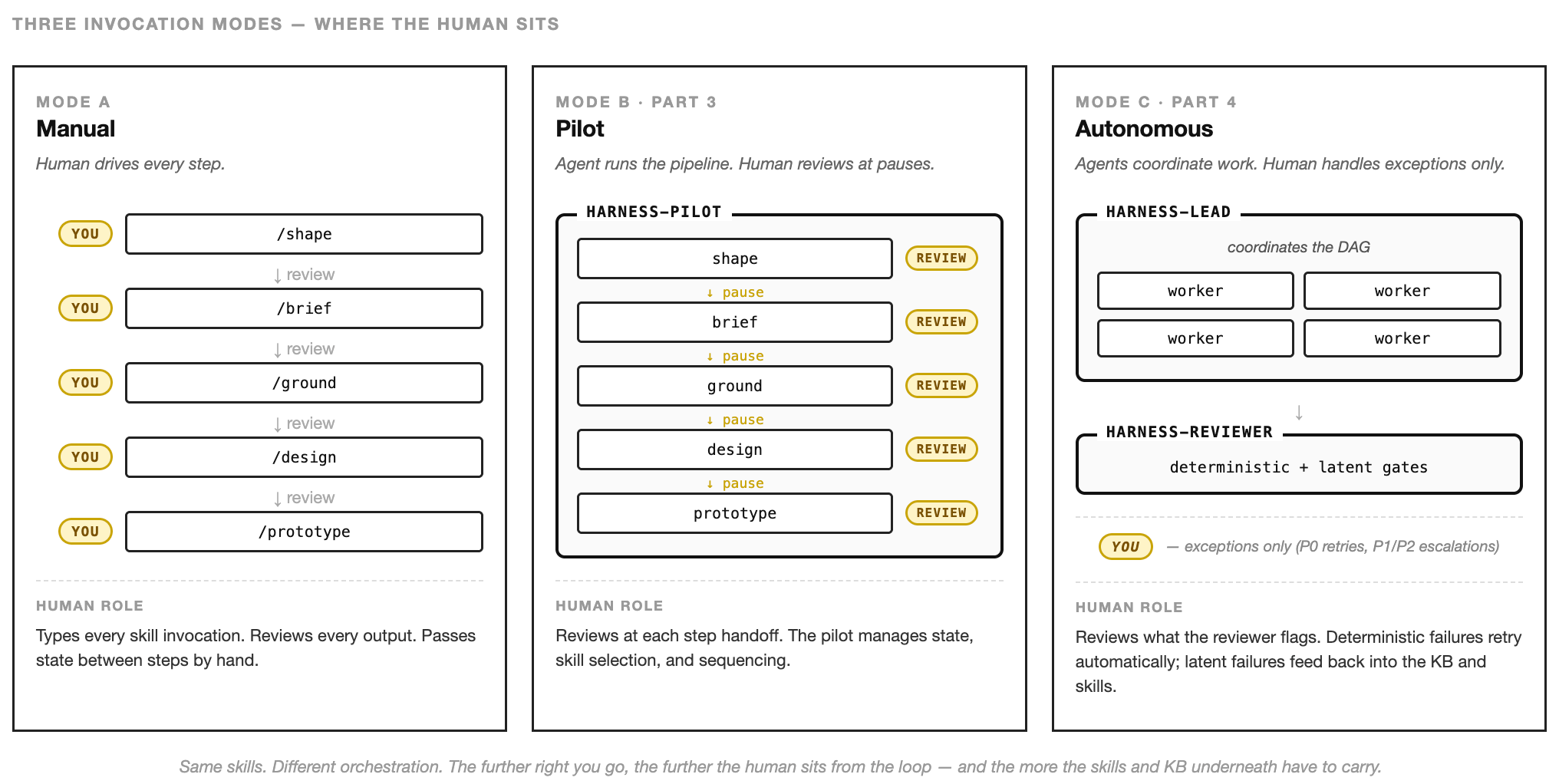
Keeping the how and the who separate matters in a bigger way too. Skills become portable — the same shape skill works whether a human types it into a chat, the harness-pilot executes it interactively, or a bigger agent runs it headlessly. And you can compose agents the same way you compose skills. The harness-pilot is one composition: one agent, one linear pipeline, human in the loop at every step. The next article describes two more — a harness-lead that coordinates parallel workers across tasks, and a harness-reviewer that sits between worker output and the main branch, deciding what’s ready to merge.
The pattern stays the same. The skill encodes the workflow. The agent encodes who’s doing it and under which guardrails. One agent running the pipeline interactively is the safest way to start — and it’s enough for a surprising amount of work.
What compounds
Part 2 showed how the knowledge base compounds — every correction strengthens the context for the next session. The pipeline compounds differently. Each time the team runs shape → brief → design → prototype → ground, they refine the skills themselves. The shape skill gets better questions. The ground step gets more thorough checks. The handoff formats tighten.
After a few months, the pipeline embodies how your team evaluates ideas, validates feasibility, designs interfaces, and grounds decisions against reality. A new team member can run it on day one and produce work that follows the team’s process — because the process is encoded, not tribal.
The model is still doing the work. But the work is structured by a pipeline that your team designed, refined, and owns. That pipeline is the competitive advantage. The model is the commodity.
Next: what happens when the grounded spec is ready and agents execute autonomously. How missions coordinate parallel work, how review gates keep output honest, and how the feedback loop closes the system. The human steps back from doing to approving — but the guardrails built in Parts 2 and 3 are what make that safe.
— Luka